
Showing posts with label Sony Ericsson. Show all posts
Showing posts with label Sony Ericsson. Show all posts
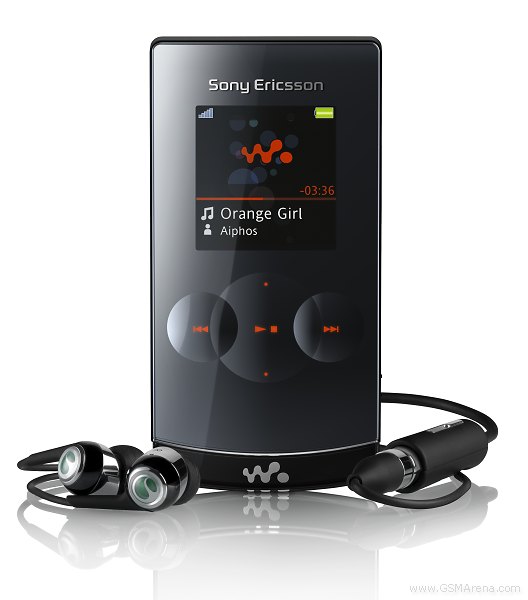
It's no news any more that we've been playing with one of the hotties of the season for some time now. Sony Ericsson W980 made a glorious entrance but we're yet to see about the exit. Set to top the Walkman feature phone lineup, W980 carries along 8 GB worth of storage, a 3 megapixel camera and a built-in accelerometer. The touch-sensitive keys and the latest Sony Ericsson feature phone interface add to the excitement. Still not interested? Then try to think of another music phone with a built-in FM transmitter!
Key features:
2.2" 262K-color TFT LCD display of QVGA resolution
3 megapixel camera
8 gigs of onboard memory
FM transmitter
Great user interface
3G with HSDPA
External 262K-color display with a resolution of 176 x 176 pixels
Walkman 3.0 music player
Shake control
Light effects
Touch-sensitive keys
Ambient light sensor
Bluetooth v2.0 with A2DP profile support
USB 2.0 connectivity
FM radio with RDS
Good battery life
Comfortable keypad
Main disadvantages:
No auto focus nor flash for the camera
Inconvenient camera lens location
Shiny surface a fingerprint nightmare
Display kinda small for a high-end phone
Awkward context keys
Camera interface not user-friendly
Aiming to meet some high-end demand, Sony Ericsson W980 brings the cream of the music centered niceties of the house. The clamshell form factor and the quite eccentric features such as FM transmitter and light effects make it hard to point a finger at its main market rivals.
One suspect that comes to mind is Samsung G400 Soul. Featuring the same flip-up bodywork, it trades the FM transmitter and the large storage space for a 5 megapixel camera. You figure if it's a square deal or else. If the G400 Soul has some of those good Samsung audio quality genes, it's in for a match with Sony Ericsson W980. With no information about the cost of either at this stage, the two devices might actually end up running in different lanes pricewise.
Anyway, we think the odds with W980 are towards a hefty price tag, which opens the door to some serious smartphone competition.
Now, one last thing before we get to the point. We should warn you that ours is a pre-release unit, so some minor changes are likely before D-day. Our units was rock solid and gave us no problems at all. So, significant changes to the overall user experience are quite unlikely.
Now then, hit the jump for a thorough body inspection of the Sony Ericsson W980.
Design and construction
In plain words, Sony Ericsson W980 is hot. The glossy front looks terrific and gives the phone a classy look when closed. Flipping it up ruins some of the pleasure, as the round buttons on the keypad are suspiciously reminiscent of the low-end Sony Ericsson R306. Imagine how that's immensely flattering the other way around. Anyway, we are still pleased with the exterior of Sony Ericsson W980 and we are sure it will make the right impression in public.
We start inspecting the Sony Ericsson W980 flip in closed position. The front panel features the square secondary display of 262K colors and a resolution of 176 x 176 pixels. When it's off, it blends perfectly with the opaque mirror surface, so much so that you cannot even guess its exact location.
Below the secondary display of Sony Ericsson W980 there are 7 touch-sensitive keys. Those are music player controls and thanks to them and the external display you can access and navigate your music player without even opening the flip. Furthermore, the FM radio can also be operated without flipping up, thanks to a dedicated key on the side of the handset.
For the radio to work however, you need the headset plugged in. When the W980 was first announced it bragged a built-in antenna to save you the effort but this has gone missing somewhere in the pre-production phase.. Real pity, as it would have been another exotic feature for Sony Ericsson W980 owners to take pride in.
The last element of interest on the front panel of Sony Ericsson W980 is the transparent stripe at its lowest part. Using some color LEDs it creates those really cool light effects when listening to music or playing games. This is undoubtedly one useless yet cool feature that we like the Sony Ericsson W980 for.
There are two colors for the light effects - orange and white. The first one is reserved for the Walkman music player and the best thing about it is that it flashes to the rhythm of the currently playing track.
Opening the Sony Ericsson W980 reveals the 2.2" main display and the keypad, which will get its due attention later on. Above the display is the secondary video-call camera. The earpiece is on its right side. At the bottom of the flip, right above the keypad, we find the ambient light sensor.
The ambient light sensor is a nice addition to the Sony Ericsson W980. It takes care of adjusting the display brightness according to the current lighting conditions. This benefits both user experience and battery life, as reducing the brightness reduces power consumption.
The FastPort connector is placed on the left side of Sony Ericsson W980. The manufacturer has once again used a combined port for charging, data transfers and earphones. This time however, they have come up with a very practical solution for the DC charger plug. It allows you to connect a second accessory along with the charger. This can come in handy if you want to listen to the radio while recharging.
The other things worth noting on the left side of Sony Ericsson W980 are the lanyard eyelet, the LED status indicator and one of the stereo speakers.
Naturally, the other speaker is on the right side of Sony Ericsson W980. Above it is the lock slider. It is a very convenient way of avoiding some unwanted presses, especially having in mind that the touch-sensitive keys respond to any kind of touch - not just by your skin only, but any object that might turn out in your pocket.
Above the lock slider is the key used for toggling stand-by, FM radio and Music player mode for the external screen. The last control on the right side of Sony Ericsson W980 is the volume rocker.
Quite customary in a clamshell, there is nothing of interest at either the top or the bottom of Sony Ericsson W980.
The rear side of the handset is finished in some nice rubber-like material. It gives a pleasant feel and, if it wasn't for the manufacturer logo, it would have also provided a reasonable degree of slip proofing when the handset is placed on a desk for example. The thing is the logo sticks out a few millimeters causing the handset to wobble when rested on its back.
In addition to the unpleasant feel, that also means that the logo will be the first thing to experience the everyday wear and tear.
As far as the functional elements on the rear are concerned, Sony Ericsson has a 3 megapixel camera with neither auto focus nor flash. Its performance will be duly covered in the relevant chapter of this review. Next to the camera lens is the light sensor that should take care of picking the correct settings for the camera to shoot.
The camera lens itself is rather inconveniently placed exactly where your index finger would rest when shooting with the Sony Ericsson W980. Getting a comfortable hold of the handset, when taking a photo, is quite a challenge.
Opening the battery cover reveals the 930 mAh BST-38 Li-Polymer battery. As we managed to confirm it is quite a performer, allowing about 4 days of moderate use. The manufacturer claims the handset is also capable of up to 20 hours of music playback, which sounds like a quite a deal.
We are generally pleased with the build quality of Sony Ericsson W980. The handset feels and looks attractive and durable. There were no creaks or other signs to suggest problems with the day-to-day handling. It also feels great in hand and, if it wasn't for the fingerprint-magnet surface and the few ergonomic flaws we already mentioned, we would've given it a perfect mark. As the things stand now - very good should do.
Display much to our liking
The primary display of Sony Ericsson W980 is a 2.2" TFT unit of QVGA resolution and 262K colors. It is not quite what you would expect in a top-of-the-range phone in terms of size, but picture quality makes up for that. The secondary screen is also capable of showing up to 262K colors but has the modest resolution of 176 x 176 pixels.
The Sony Ericsson W980 primary display has commendable contrast and brightness levels. In addition, the long standing sunlight legibility issue with some of the Sony Ericsson handsets is at least partially resolved. With the W980 the display might not be perfectly visible in every position, but there are enough angles for problem-free working with the device.
We are not as pleased however with the external display. The shiny surface severely reduces sunlight legibility. Even indoors, its picture quality isn't as impressive. On the other hand, that's an issue with most external displays, so Sony Ericsson W980 is not to be judged so harshly.
Keypad gives mixed feelings
We are rather pleased with the alphanumeric part of the keypad of Sony Ericsson W980. The keys are comfortably sized and there is more than enough space between them so you can hardly make a typo. The press feedback and touch orientation are also quite good. We are happy with the typing skills of Sony Ericsson W980.
What we don't like is the six keys around the D-pad. Those are way too tiny and very hard to use, especially if you have larger fingers.
Other than that, we have little complains. Even the touch-sensitive keys on the front panel are nice to use. We still prefer the regular press keys but those somehow managed to avoid getting on our nerves.
The backlighting of Sony Ericsson W980 is strong enough but slightly uneven. Still it is good enough for making the phone perfectly usable in the dark. Furthermore, the light effects look all the more cooler in such conditions making the handset a real eye-catcher.
User interface really snappy
A high-end phone, it is no wonder Sony Ericsson W980 has the most advanced version of the user interface of the house. The UI has the typical Sony Ericsson feature phone styling, and offers an extensive set of options and settings.
The standby screen of Sony Ericsson W980 has pretty standard looks. It shows the pre-selected wallpaper and the typical status info in the top bar. That includes signal strength, battery status, the type of currently used data transfer method (3G, EDGE, GPRS) and the icon of the currently active profile (none if General is selected). Beneath the top bar are the operator logo, the clock and date. The bottom bar is reserved for the descriptions of the functions assigned to the confirming center of the D-pad key and the two soft keys.
There are four options for the main menu layout of Sony Ericsson W980. In addition to the traditional 4 x 3 grid, the main menu now has a couple of alternative views: rotating and single icon. The last option is to use the layout of the currently selected Flash Lite theme.
There is nice icon animation, which is most obvious when one of the standard Sony Ericsson themes is applied. When you select an icon it smoothly pops up on the display for a moment before you see the next screen. Besides, there are a number of animated transition effects throughout the interface plus some eye-candy reflections.
Sony Ericsson W980 features the well-known Activity menu, which is a really handy, especially for a feature phone. It offers quick access to a number of selected functions. In addition, the Running Apps tab takes care of multi-tasking.
With Sony Ericsson W980 you can even minimize the status window when you receive files via Bluetooth and restore it through the Running Apps tab. However, this is not the case when you are sending content via Bluetooth. The other features of the Activity menu are quick access to recent events, web menu and the My Shortcuts tab, which is a user-configurable list of favorite features.
As most previous models, Sony Ericsson W980 comes with a dedicated Flight mode. It switches all transceivers off but, unluckily, requires a reboot. The other problem with the flight mode is that it can only work with a SIM card inserted, unlike some of the handsets offered by competing brands.
In general the user interface of Sony Ericsson W980 is really snappy with no lagging or holdups anywhere. We wouldn't have expected any different in a high-rated device anyway.
Generously sized phonebook
The phonebook of Sony Ericsson W980 has a capacity of 1000 entries with a total of 7000 phone number fields. You can opt for either the SIM contacts or the phone contacts to be default for the phonebook. Displaying both lists simultaneously is impossible but a nice option allows you to auto save to SIM any new contacts that you're saving in the phone memory.
With Sony Ericsson W980 you can choose whether to order your contacts by first or by last name. Naturally, you can search by gradual typing of the desired name.
When adding a new contact, the available details are stored in five different tabs. The first tab offers 7 phone number fields, while the second tab is for email and web addresses. The third is for assigning a picture, custom ringtone, custom message tone (now that's a new one) and a voice command. The fourth goes for postal details. The last, fifth tab, is for making an additional note and adding a birth date.
A nice feature of Sony Ericsson W980 allows you to add each birthday you enter to the calendar and set a reminder with a single click.
Telephony is excellent
Sony Ericsson W980 offers spotless handling of calls. Voice quality is great on both end of a call with no interferences whatsoever.
When it comes to dialing numbers Sony Ericsson W980 really scores a point with its Smart Search dialing feature. It looks up contacts whose numbers contain the digits you have typed or whose names begin with the corresponding letters.
The Calls log application brings no news. It is divided into four different tabs, including All, Answered (Received), Dialed and Missed. When there are several calls made to or from a single contact, only the last one gets displayed.
Messaging worth a praise
The messaging menu of Sony Ericsson W980 is really advanced offering a lot of features and nice user-friendly interface.
On top of the usual messaging functionality, Sony Ericsson W980 offers the now-becoming-standard Manage Messages and Manage Email features, Message Categories and plenty of settings.
The Manage Messages application allows messages to be moved between the memory card and the phone memory, arranged by categories, date, size, and contact as well as other options for improved message handling.
With Sony Ericsson W980 all messages, except emails, share a common inbox. No matter of the type of the message it goes to the shared folder.
When composing a message, the character counter will alert you when you're 20 symbols short of the 160-character limit. After that it will count down the remaining symbols before eventually the "SMS 2" warning appears to indicate that you have exceeded the limit. Predictive text input goes without saying in a high-end phone like this one.
We are also pleased with the email client of Sony Ericsson W980. It supports dozens of settings and all types of encodings, some of which we are only used to seeing in more advanced messaging devices.
Sony Ericsson W980 can save attachments, no matter if they are supported or unknown file formats. Emails can also be sorted by size, date and time.
Viewing a message fullscreen and changing the font size (small, medium, large) are handy options. There is a separate Manage email application, with the same structure and features as the one for SMS.
A tad disappointing is that Sony Ericsson W980 cannot view any office documents such as Word, Excel and PDF files. All recent Sony Ericsson phones don't have that functionality and we think it's about time that they did something about it. The presence of a document viewer really earns a point here for some competing brands such as Samsung and LG.
Still, on the whole, we are happy with the messaging software of Sony Ericsson W980. Combined with a typing-friendly keypad it can really become a heavy texter's best friend.
Multimedia the Walkman way
As usual with Walkman phones, the Sony Ericsson W980 Media center is one of the highlights of the device. It allows instant access to the Photos, Music, Videos, Games and Web Feeds on the handset The current pick is highlighted and the count of stored files is displayed.
Since the Sony Ericsson W980 is equipped with a built-in accelerometer, the Media center interface rotates automatically to match the handset orientation - much like the Sony Ericsson W760. We are however not entirely happy with the accelerometer in W980 - it could've been much more responsive.
The auto-rotation also works in the Picture gallery, as well as the Music and Video players. Luckily, you can also set a fixed orientation of the Media center in case the auto rotation feature is bugging you.
Image gallery in perfect shape
The Photo gallery of Sony Ericsson W980 is definitely among the best we've found in a mobile phone. It's a convenient tool for managing a vast collection of pictures with great customization capabilities and features.
Some of those options include: one-click access to the latest snapshot you've taken, timeline view for your images and tags that can later be used for filtering. With Sony Ericsson W980 you can also mark some of your photos as favorite and make accessing them even easier through the favorite photo feed.
The Timeline view of the Camera Album displays image thumbs filtered by the month they've been taken. The currently selected photo in enlarged so you can make out what is on it without having to open it.
Another eye-pleasing feature of Sony Ericsson W980 is browsing images in fullscreen mode. When you want to go to the next in line, it doesn't simply pop up but instead slides in from left or right. Then, when exiting the full screen view of a picture, it smoothly zooms out to thumb view. That might be just visual lollipop but it does boost user experience with the gallery. The best part about it here is that it doesn't slow down the phone at all and we experienced no holdups browsing our pictures.
True to its Walkman nature, Sony Ericsson W980 really knows a nice slide show. It prompts picking a mood before you start, so it can set the proper background music and transition effects.
The only things missing are the option to pick a custom track for the slide show or export the whole thing as a video file. Still, this isn't that much of downer. Besides, you can always use the VideoDJ application for creating videos with custom transition effects between photos and background music of your choice.
Having mentioned editing, we have to say that Sony Ericsson W980 also sports the PhotoDJ image editing application. It is however downgraded from what we've seen in earlier Sony Ericsson handsets and we are not really impressed.
Can't beat Walkman 3.0
The Sony Ericsson W980 features the Walkman 3.0 player with all the niceties included. The player supports a vast collection of file formats and has several equalizer presets. In addition, you also get Album art and the proprietary Sony Ericsson Shake control making use of the phone's built-in accelerometer.
As with previous versions, the music player offers step-by-step filtering of the tracks you want to hear. A genuine Walkman phone, Sony Ericsson W980 features a dedicated Walkman key for accessing the music player and an icon in the main menu for the exact same purpose.
The Walkman 3.0 "Now playing" interface is simple and intuitive. The D-pad is in charge of music controls and also brings up a list of all the tracks in the current playlist or album.
As we already mentioned, Sony Ericsson W980 is also able to display Album art but you can also go for one of the alternative visualizations available. Bear in mind however, that those are squeezed in the small square that Album Art normally uses, so you should not expect miracles from them.
When you minimize the music player, the currently playing track, album and artist get displayed on the home screen with some nice graphics that perfectly blend with the Flash Lite theme used.
One of the best parts of Sony Ericsson W980 and its music player is the fact that it can be controlled without even opening the phone. The six touch-sensitive keys, plus the mode change key on the side of the handset, are all you need to operate it. This gives you a much quicker and convenient access to your music, albeit with poorer graphics.
The already mentioned light effects are another cool and exotic feature of the Sony Ericsson W980. The way they go to the rhythm of the currently played track is quite impressive.
Equalizers appear as fullscreen graphics on the Sony Ericsson W980. You can also create a custom equalizer if the presets don't do the trick.
Another highly promoted feature of the Sony Ericsson W980 is Shake control. It allows you to change the currently running track and even shuffle your entire playlist by a simple flick of the hand. All you need to do to use Shake control is press the Walkman key and shake the phone forward (for going one track forward) or backward (for going a track back). A quick succession of the two moves does the shuffle trick.
With the W980, Shake control works like a charm and really shows the use of an accelerometer. It is much more responsive as a music player control than in screen rotation. It would have been better still if the walkman key was on the side of the phone and accessible without having to flip.
The other high pitched Walkman goodie, SensMe, is a nice alternative for browsing your music collection. It gives you the opportunity to search tracks that match a certain mood instead of a specific artist, album or genre.
The interface is original and visually appealing. The tracks appear as dots placed on a coordinate system with a horizontal and vertical mood axis. Creating a playlist is as simple as circling a group of those dots. Naturally, the range of the selection can be customized.
On the negative side, setting up the mood of any given track manually is impossible. This means that if you simply copy a bunch of tracks to your Sony Ericsson W980 they won't be available for the SenseMe feature.
In order to make the SensMe work, you need to upload your music to the phone via the Sony Ericsson Media Manager software for PC with the SensMe Analysis option enabled. This however does take its time, so if you are in a rush you will probably have to live without the SenseMe until next time.
FM radio with RDS and TrackID
The integrated FM radio of Sony Ericsson W980 has memory for 20 stations and supports RDS.
It also sports the TrackID music recognition service, which has been around for quite some time now and doesn't need an explanation. Much like the music player, the radio can be minimized or controlled on the external screen of the W980. However when minimized, it has none of the fancy graphics the Walkman player has to offer.
When first announced, the Sony Ericsson W980 was also expected to have another cool radio feature. Back there in Barcelona, the prototypes used to have a built-in antenna that allowed listening to music without plugging in a pair of headphones. In the end, this feature was ditched, much to our disappointment.
Video player with slow motion and screenshots
Sony Ericsson W980 comes with a really nice video player. It supports fast-forwarding and rewinding, as well as playing clips in slow motion. It has landscape mode, as well as settings for video size like Original, Auto Fit and Fullscreen.
A really cool feature of the video player is the screenshot capability. It allows you to save a frame of video and add it to the gallery.
FM transmitter
Finally we come to one of the most exotic and intriguing features of Sony Ericsson W980 - the FM transmitter allowing you to broadcast your favorite tracks. Those can then be picked up by any device with an FM radio receiver in the vicinity. The signal strength of the W980 is really good, even outperforming some dedicated FM transmitting devices we have seen.
The quality of the sound transmitted isn't exactly Hi-Fi but it does the job. A pleasant surprise was that it transfers the artist and the track name over RDS. The FM transmitter can be put to good use in quite a number of situations - in a car or at a party, just to name a couple.
Audio quality
We are very pleasued with the overall audio quality of Sony Ericsson W980. It definetely has some potential and apart from the rather high intermodulation distortion and total harmonic distortion showed very good results. Its frequency response is almost identical to that of Apple's dedicated music player - the omnipresent iPod.
You should however bear in mind that the flaws in the audio quality might be due to the fact that our unit was a beta version. Those might as well be fixed in the retail version making Sony Ericsson W980 on the better side of handsets on the market in terms of audio quality.
Camera: we deserve better
The Sony Ericsson W980 is equipped with a 3 megapixel camera and is capable of capturing images at a maximum resolution of 2048 x 1536 pixels. It has neither auto focus nor flash and that speaks enough. Add the awkward location of the camera lens (exactly where your index finger will rest when holding the phone) and the lack of a dedicated camera key and you get (or probably won't get) the picture.
The camera interface also smells low-end, with basic graphics and limited number of features. It is nowhere near what some other Walkmans like the W910 or W890 have to offer. Real pity, as we are more than sure a decent camera interface wouldn't have been that much of an effort.
At least the built-in accelerometer of Sony Ericsson W980 is put to good use, with the handset orientation getting recorded in the camera images EXIF tags. This allows most imaging software to auto-rotate the image to its intended orientation.
The available camera settings are rather scarce too. As for additional shoot modes, you have Panorama and Burst at your disposal. There's also Night mode, Self-timer, White balance and Color effects options. And that's about it.
As far as picture quality is concerned Sony Ericsson W980 leaves us with mixed feelings. It renders colors very precisely and the photos can hardly be accused for lacking contrast. On the other hand the very aggressive noise-reduction technique that is being used eradicates all the fine detail from the pictures.
It seems that a smaller-size sensor has been used for the Sony Ericsson W980, which is producing very noisy images. In order to hide the noise the very strong noise-reduction algorithm step in action, considerably reducing the detail levels. This is a solution typically used for lower-end devices and we are rather disappointed that the Walkman flagship didn't receive better treatment.
As far as video recording is concerned, our test Sony Ericsson W980 unit went as far as QVGA at 15fps. We know better though than rushing to a conclusion about video capabilities of beta units. There have been several cases when handsets that could only reach QVGA@15fps in their prerelease stages went as far as QVGA@30fps in the retail version.
Connectivity: all but Wi-Fi
Sony Ericsson W980 supports virtually every kind of network connection that you need. HSDPA, UMTS, EDGE are all on board. That means that you can have as quick network-based internet access as your carrier can offer.
As far as close-range connectivity is concerned the Sony Ericsson W980 supports USB and Bluetooth, both v2.0. Bluetooth also comes with A2DP support, so you can enjoy your favorite tracks on a set of stereo Bluetooth headphones. Furthermore, the phone could be used as a Bluetooth modem for accessing the Internet on a PC or notebook computer.
There are two things we are missing in the connectivity options of the Sony Ericsson W980. While the Wi-Fi is still a rarity among feature phones, a memory card slot doesn't seem like that much to ask. Yeah, we know that the phone has 8GB of internal memory, but we're talking connectivity options here, not storage.
Our tests with Sony Ericsson W980 showed write speeds of about 1800 KB/s. When reading the data from it, it gets as high as 2500 KB/s. While those numbers might sound sweet to some, they are not up to what a card reader can achieve. On the other hand, they are one of the best among the 8GB phones we have tested. For example we could only achieve 730 KB/s upload and 840 KB/s download speed with a Nokia N95 8GB we had laying around our office.
Web browsing: a great experience
Sony Ericsson W980 uses the latest 3.4 Access NetFront HTML browser. It's similar to the web-oriented Sony Ericsson K660 and G502.
Elaborate web pages are rendered brilliantly and can be displayed in both portrait and landscape mode. Fullscreen is also available and so are different zoom levels. Panning/scrolling speed is quite up to standard. Screen auto-rotation is seamless too, thanks to the built-in accelerometer.
The web browser offers a virtual mouse pointer, which is a real pleasure to work with. Another interesting and practical feature is the "Find on page" option. It searches the loaded web page contents and the first match is immediately listed as soon as you type a letter, much like the desktop Mozilla Firefox browser for example.
Time-managing applications are all here
All the typical time-managing Sony Ericsson applications are aboard the W980. Those include nice calendar and alarms applications, task-manager, Notes, Timer, Stopwatch, and Calculator.
The Calendar of Sony Ericsson W980 offers the traditional monthly, weekly and daily view modes. There are also a few types of events available for setting up. Those however do not have their own unique fields for each type, so the names are all the difference.
As far as alarms are concerned, there are five alarm slots available on Sony Ericsson W980. Each of them offers three tabs with various configurable options. You can set the alarm day and the tone, as well as the name and the picture displayed on activation.
There are two types of tasks for the task-manager: simple Tasks and Phone calls. When setting a phone call task, you can either enter the phone you have to call or you can look it up in the phonebook of your W980.
Notes are written similar to messages; T9 dictionary can be used here as well. A nice feature is the option to display notes on the Home screen. The Voice recorder has no limit to recording length, making the free memory available the only restriction.
The Calculator is the regular Sony Ericsson application.
The stopwatch and countdown timer are also the well known basic applications.
Finally, Sony Ericsson W980 also features a Synchronization application. Its purpose is to ensure seamless synchronization of your phone with SyncML and Exchange ActiveSync servers.
Additional applications
As far as additional applications are concerned, Sony Ericsson W980 has some to boast. There's a comparatively large number of Java-based applications in the designated folder of the organizer submenu.
We start with the AccuWeather application. It gives you up-to-date weather information for locations of interest. Current conditions overview and a three day forecast is available for a great number of cities around the world. You should bear in mind that the data is downloaded in real time so data charges may apply. Not that we can think of any other way for the application to work but we still feel a warning is due.
The Java-based Converter fills in for the absence of a native application on the Sony Ericsson W980. It works with distance, volume, weight, temperature, speed, and area. There's also a tip calculator, which allows splitting a bill, topped with a predefined rate, equally.
One of the most interesting applications that come preinstalled on Sony Ericsson W980 was the Music Mate 5. It consists of several music-centered mini applications. The first of them allows you to play music by shaking your phone. You can choose from a huge list of musical instruments for each direction.
One of the most interesting applications that come preinstalled on Sony Ericsson W980 was the Music Mate 5. It consists of several music-centered mini applications. The first of them allows you to play music by shaking your phone. You can choose from a huge list of musical instruments for each direction.
There is also a step counter on the Sony Ericsson W980. It may be set to work in the background, counting the steps you make throughout the day.
And finally, World Clock 3D allows you to spin the globe searching for a time zone. You can zoom in and out as you please. Of course you can also search by city name.
Games are entertaining
The gaming department of our Sony Ericsson W980 features three titles - Need for Speed: Pro Street, Lumines block challenge and Sudoku.
The Need for Speed: Pro Street game has cool 3D interface and is well worth giving a try (or a shake if you prefer). It can be controlled by simply tilting the phone left or right thanks to the built-n accelerometer. We however did prefer the old-fashioned (and way more convenient) D-pad control for that purpose.
The last game is a java interpretation of the world-popular Japanese game. It has nice interface and a enough difficulty levels for every taste.
Final words
As time has come for us to part with Sony Ericsson W980, we are left with quite positive impressions. The latest Walkman clamshell has a really nice feature-pack and great user interface to back it up.
The camera functionality was the only serious disappointment - the lack of auto focus and the ridiculous camera interface are anything but appropriate for a high-end such as this one.
However the Sony Ericsson W980 manages to flaunt a number of unique extras that make it stand out. The piano black front, light effects and the FM transmitter are not something to find on every other phone out there. Identity is getting more and more crucial in the overcrowded mobile market. That alone is enough for a well deserved pat on the back for Sony Ericsson W980.
The only reason for a cool-off is the lack of information about the expected price of Sony Ericsson W980. We can't help anticipating a rather hefty price tag on the new Walkman flagship. This might just be enough to throw it in the pool with some big sharks and we are not quite sure if the W980 will make it there. We do like it enough though to hope it proves us wrong.
Posted under:
Sony Ericsson
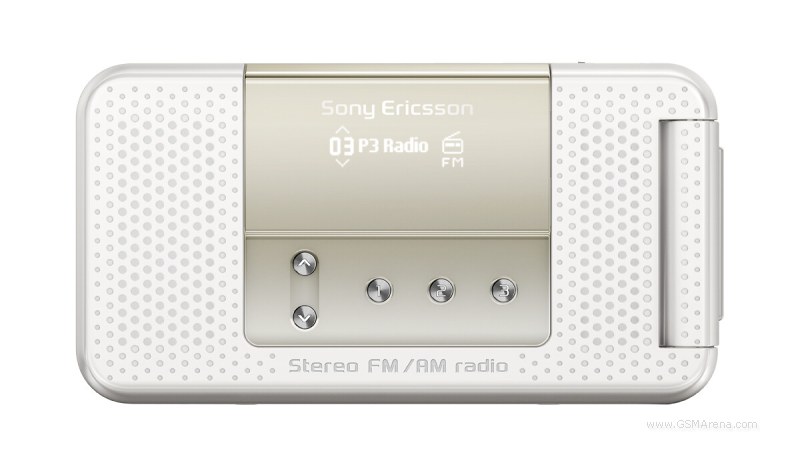
Sony Ericsson R306 Radio is quite unusually set to revolve around one single thing - listening to radio on-the-go. Its built-in radio tuner works in both FM and AM. The lower midrange R306 Radio delivers on other fronts too - it packs a 1.3 megapixel camera plus Bluetooth and USB connectivity. It's compact enough but also offers two surprisingly capable stereo speakers. How's that for a flashback to the time when family life revolved around the radio. The dedicated external radio keys complete the feature set of that nifty little fella. You are welcome to tune in and see what it's like to spend some time with it.
Key features
FM/AM radio tuner with RDS and TrackID
AM tuner has two modes: 9 kHz (Americas and Japan) and 10 kHz (the rest)
Dedicated external radio controls
Tri-band GSM support
1.9" 65K-color TFT display of a 128 x 160 pixel resolution
Secondary monochrome external display of a 96 x 32 pixel resolution
1.3 megapixel camera
5MB of internal memory
Bluetooth
USB
Radio broadcasts recorder in MP3 format
Stereo speakers
Optimized design for desktop placing
Main disadvantages
External display has low daylight legibility due to the mirror finish
Radio is not that usable without the headset plugged in
Standard headset jack is huge
RDS readings not shown on external display
Stores 20 stations only for AM and FM bands combined
TrackID doesn't work with the radio
Announced in January 2008, Sony Ericsson R306 Radio is among the first handsets to drive heavily on the built-in radio tuner that is usually just an extra feature in most other handsets. When closed, the R306 certainly looks the part with dedicated radio keys and vintage radio looks. The Sony Ericsson R306 Radio is also unique for offering an AM radio tuner.
Anyway, the R306 Radio is a lower midrange handset and all specifications match that tag. We won't be expecting miracles from it, but by the sound of it (pun intended), we think that it just might deserve some attention.
So, tune in to our show as we explore the Sony Ericsson R306 Radio right after this jump.
Design and construction
Sony Ericsson R306 Radio has a stand-out design. The clamshell measures 90 x 47.9 x 15.8mm when closed and weighs 93g. The 15.8mm thickness is far from slim by any standard but the chubby clamshell handles quite well.
The body is made of plastic but a few shiny silver elements here and there certainly make a difference.
The display is a 65K-color TFT unit with a resolution of 128 x 160 pixels. It measures 1.9 inches in diagonal but the low resolution has taken its toll on the appearance of the user interface.
The keypad is utterly flat and the space between keys is too much, so in the end tactility suffers. The D-pad is quite large too, but the confirmation center is small, rigid and not sufficiently elevated - the overall result is far from user-friendly. The upper direction of the D-pad is a fixed shortcut to the radio.
Around the D-pad there are two context keys, two receiver keys, a correction C key and a Shortcut key (much like the Activity menu key in more sophisticated Sony Ericsson handsets).
On the right-hand side of the Sony Ericsson R306 Radio there are no controls whatsoever. But there's a reason for that - on that side there are a couple of small rubber knobs that allow the R306 to stand on your desk (or any other even surface for that matter).
On the left-hand side you can find the volume rocker, the dedicated radio key and the regular Sony Ericsson Fast port.
On the outside the Sony Ericsson R306 is covered in matt black plastic that doesn't catch fingerprints easily. The centerpiece on the front panel is the glossy film coating of the external display. Below it there are five shortcut keys - a couple of them are used to switch between stored radio stations and the other three are used for quick access to three custom selected favorite stations.
Removing the battery cover is easy enough - it comes off with a slide, unlike most recent Sony Ericsson handsets with their pry-to-open rear covers.
Underneath the R306 cover is the standard Sony Ericsson BST-38 Li-Ion battery with a capacity of 930 mAh. It's quoted at up to 410 hours of standby time and up to 9 hours of talk time.
Holding the R306 in hand definitely gives a lightweight and compact feel. The plastic panels are quite nice to touch. Unfortunately, when it comes to ergonomics and the simple task of opening the clamshell, the R306 loses some points. The R306 Radio is really hard to flip single-handedly - you have to use both of your hands every time.
The R306 display is nothing special really. It's a low-end TFT display capable of displaying 65K colors and it offers the rather low resolution of 128 x 160 pixels. We are so used to QVGA resolution now that everything below that feels… well, insufficient.
Other than that, the display contrast is not on par either but backlighting is ok. You're also not to expect anything fancy from it under direct sunlight - legibility certainly suffers.
Moving ahead to the backlighting of the keypad we've got to note it's a bit uneven but it's not that much of an issue.
The external display of Sony Ericsson R306 Radio is a kind of a mixed bag. Due to the high-gloss finish it's almost unusable in broad daylight - and we don't even mean direct sunlight here.
The secondary display shows info about the current station you've tuned to or, if the radio is not on, you can spot the clock and battery and signal status. And finally, the incoming call ID is also displayed here.
User interface rather low-end
Sony Ericsson R306 Radio has a scaled-down version of the regular Sony Ericsson interface. It lacks in looks and its functionality is nowhere near the standard offering. It is similar to what we saw in Sony Ericsson T303.
Although there's no Flash Lite theme support, there are several upgrades over the core functionality of the UI, compared to the low-end peer Sony Ericsson T280 we previewed not so long ago. The major improvement is the tree soft key layout, which we love the most. Other than that, there is "My shortcuts" menu, tabbed settings, smart search, TrackID, etc.
Phonebook is nice
The phonebook stores up to 1000 entries with a total of 2500 phone number fields available. As usual, you can choose whether the SIM contacts or the phone contacts should be default for the phonebook. Displaying both lists simultaneously is impossible. On a different note, a nice option allows you to auto save to SIM any new contacts that you're adding to the phone memory.
Contacts can be ordered by First or Last name. They are searched by gradual typing of the desired name.
Contact details include up to seven different phone numbers plus an email address, web address, custom image, ringtone and message tone, postal address details and, finally, a note and a birthday. So basically, with the Sony Ericsson R306 you get the same phonebook as with its bigger brothers.
Call management
When it comes to making calls, a nice feature is the Smart Search, which lists all available contacts in the phonebook starting with the digits typed on the standby screen. The search facility looks up both letter combinations in names, and phone numbers that start with the digits entered.
The Call log is divided into four different tabs. They are: All, Answered (Received), Dialed and Missed. When there are several calls made to a single contact, only the last one gets displayed.
The Sony Ericsson R306 Radio scored quite high in terms of loudspeaker performance. We shouldn't forget that it has two front-facing stereo speakers to deliver it. A nice surprise, even if it's purely an observation, is that the R306 had more bass than any other handset we've reviewed recently. It's obviously an attempt to get that key radio feature right on all sides.
No email in messaging
R306 Radio has basic messaging functionality, with no email client onboard. What you get is text, picture and voice messaging. The Manage Messages function is not available but, luckily, sorting messages by category is at hand.
All messages use one Inbox. No matter what kind of message has been received, it goes to the shared Inbox. When composing a message, the character counter will alert you when you're 10 symbols short of the 160-character limit. The T9 dictionary goes without saying.
Users may opt to sort messages by category list, if a specific category has been defined for a message. Categories are fully customizable as well. You can also delete all messages in a given category.
Furthermore, messages in categories can have their own sorting with Contact, Date, and size the available filters to choose from. Much like in Sony Ericsson W890, in the general inbox there is no indication if a message has been assigned a category.
Composing a picture/MMS message uses the same interface as most of the latest Sony Ericsson phones. Opening a new Voice message automatically starts the voice recorder. After the message has been recorded it can be sent immediately or played first.
Little multimedia juice
The multimedia department is among the weakest points of the compact Sony Ericsson R306 Radio. There is only 5MB of onboard memory and no microSD expansion. There's no music player either, but at least you can use MP3 files as ringtones.
Images on the Sony Ericsson R306 Radio are only accessible via the File manager. Unfortunately, the viewing options are quite limited - there is no zoom function and image browsing is quite sluggish. Images can be sent via Bluetooth or MMS. Moving/copying/renaming are among the few other usable options.
Interestingly enough, the file manager couldn't open the 1.3 megapixel images produced by the camera. It returned an error message alerting of insufficient memory. Now this might be a simple bug of our pre-release handset but we don't know for sure.
Photos taken by the camera in 1 megapixel resolution open up just fine. But the presence of both 1.3 megapixel and 1 megapixel options in the camera menu leads us to believe that this might just be a regular handicap of the R306 and not a bug.
It's all about the radio
The integrated FM/AM radio tuner of Sony Ericsson R306 Radio has memory for 20 stations and supports RDS. Unfortunately, the RDS info is not displayed on the external display - only the name under which the station is stored appears there.
As far as AM bands are concerned, the R306 Radio supports AM 9 kHz (North America, South America and Japan) and AM 10 kHz (Europe, Asia, Africa, and Australia). That's pretty well covered, we guess.
Unfortunately, the 20 radio stations memory is used for both the AM and FM radio stations.
The radio application doesn't have any equalizer presets, however there's a concert sound effect available. Subjectively speaking, radio broadcasts sound much better with it when you use the headset - you can toggle between the Normal and Concert modes with a press-and-hold of the external Radio key on the left side of the handset.
When you channel the radio sound to the external stereo speakers, an additional sound effect becomes available. It's called Volume boost and it's really up to the task. The Concert mode doesn't sound as good on the external speakers. When the speakers are on, you can toggle the Concert and Normal modes with a SHORT press on the external Radio key. We really don't know why the inconsistency. The volume boost mode however is only available through the menu of the Radio application.
Other than the standard functionality, users can also record a broadcast from the radio much like with the Sony Ericsson T303 we reviewed recently. The recordings are stored in MP3 format - there aren't any complex settings - you only have to choose between Normal and High quality mode. The High quality delivers a constant bitrate of 64Kbps@16KHz, but as we managed to confirm the recordings turn out with a quality inferior to the original radio broadcast.
Our biggest concern with the radio functionality of the Sony Ericsson R306 is the need to use the supplied headset as an antenna. Now that sounds like a regular deal on most other mobile handsets, but a radio-centric device like this one certainly calls for another solution.
In fact, you can turn the FM radio on without plugging the headset and it can even pick up some stronger radio signal but it's still a rather inadequate solution. If you hold it in your hand the reception gets a bit better to a… let's say… passable level. It's still not up to scratch for a radio-centric device.
That being said, we have the example of another solution that sounds much better - the O2 Cocoon we recently reviewed had a dedicated antenna cable supplied in the retail package - much like the one you get with your regular home stereo. With it you can still enjoy radio reception when your handset is docked on your desk and it can save you some of the mess that headsets usually create.
And finally, Sony Ericsson have created a custom headset for the Sony Ericsson R306 that makes things even worse. It has a huge jack - bigger than any other Sony Ericsson jack we've seen. And when we say huge we mean it - it increases the width of the R306 body by almost a half when plugged.
It has an aerial sign on it and its size suggests some sort of an enhanced antenna contraption - we don't know, and we don't really care either. The bulk you plug in for the radio to work properly totally ruined the experience for us. It gets in the way when you try to open the clamshell… It gets in the way when you try to press one of the keys on the left side… And did we mention it's darn huge?
Unfortunately, there is no TrackID music recognition feature in the radio application itself. There is a separate TrackID Java application in the R306 but you can't use it with the radio. It works only with external audio sources such as your home stereo or car audio system.
The TrackID application samples music through the handset built-in microphone and then connects to the Gracenote servers to try and get the artist and track names. We tried channeling the radio through the external speakers and then we started the TrackID sampling process but the radio audio gets muted during that short time of sampling. So essentially, the TrackID music recognition service is not available for the tracks you listen to on the radio.
Not much of a camera
Sony Ericson R306 Radio has a 1.3 megapixel shooter producing photos with a maximum resolution of 1280 x 1024 pixels with no flash of any kind. The camera is placed on the back of the clamshell which makes taking pictures of your index finger a favorite pastime.
Among the few customizable things are picture size (1.3 MP, 1MP, VGA), picture quality (fine, normal), effects (black & white, negative), and the night mode. In the main camera menu there are two additional settings - the 2.5 digital zoom (in VGA mode) and exposure correction from -2/+2.
Image quality seems ok for a 1.3 megapixel snapper. The only flaw we found with the handset is that it can't open any of the 1.3 megapixel images produced by its own camera. You'll have to use the 1 megapixel images size in order to access the photos on your phone.
The camera can also record video but in really low sub-QCIF resolution that is only usable for MMS messages. We no longer publish video samples that are below QVGA resolution.
Connectivity, web browsing and applications
Sony Ericsson R306 Radio is a tri-band GSM/GPRS phone. The handset will be available in three versions: R306i Radio supporting GSM 900/1800/1900, R306a Radio for the Americas running on GSM 850/1800/1900, and R306c Radio for China with GSM 900/1800/1900 support.
You can rely on Bluetooth for close-range wireless transfers. Unfortunately, the R306 doesn't have support for the Bluetooth file transfer service, you only have Object Push but that's enough for exchanging files between mobile devices.
The Sony Ericsson R306 has a built-in WAP browser - it handles HTML sites but complex web pages are too much for the device. We had a hard time browsing gsmarena.com, and we even had issues with WAP sites but truth be told - our unit is still a pre-release one, so hopefully that should be fixed.
Sony Ericsson R306 Radio offers several time-management features such as a Calendar, Alarms, Tasks, Notes, Timer, Stopwatch, and Calculator.
The Calendar offers month, week and day views. When you enter a birth date in the phonebook, the phone prompts adding it to the calendar.
As far as alarms are concerned, there are five alarm slots available. Each one offers a lot of options - you can opt to repeat the alarm on chosen days of the week. Text and a picture can be added to the alarm, a custom tone too. Of course you can set up the radio to wake you up instead of a tone.
Tasks can be two types: simple Tasks and Phone calls. Notes are written similar to messages; the T9 dictionary can be used here as well. A nice feature is the option to display notes on the Home screen.
The Sound recorder has no limit to recording length, making the free memory available the only - and harsh enough - restriction. The Calculator is the regular Sony Ericsson application. It offers the basic functions, no bells and whistles. There isn't much to note about the stopwatch and timer either.
The Sony Ericsson R306 Radio comes with two games pre-installed. The first one is Johny Crash does Texas (in a stunt kinda way), and although it sounds like an XXX title it's in fact an amusing game. The second game title is the Mah Jong Quest which is a game of logic.
Final words
Sony Ericsson R306 Radio is to join the low-to-midrange company portfolio. It pretty much has the basics covered with 1.3 megapixel camera, Bluetooth, Smart search dialing. The advanced radio features include stereo speakers, RDS, TrackID, broadcast recording and the dedicated radio controls.
The scarce built-in memory and the lack of a card slot tend to limit it in many ways. We could also go on about a tad better display resolution and better imaging quality. But probably our most important grudge of all with this radio-centric device is the need to plug the headset in for the radio to work properly.
Now that's a common nuisance in all modern handsets, but on a phone that's supposed to be "all-radio" it becomes much more obtrusive. The huge headset jack makes things even worse. Some new design to deal with that would have been much appreciated. And in the end, a dedicated cable aerial such as the one of O2 Cocoon would have meant a lot less hassle.
Anyway, R306 is a low-ender after all. There will always be a market for down-to-earth entry level handsets. Plus, Sony Ericsson R306 gets its edge from the vintage radio looks that give it a distinct personality.
Posted under:
Sony Ericsson
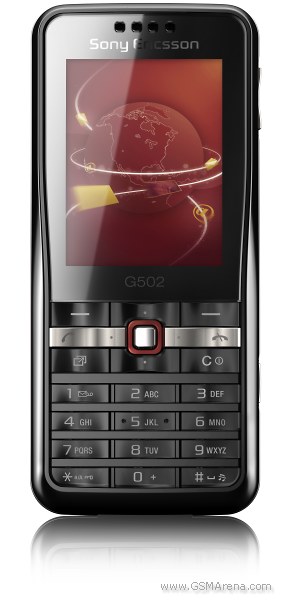
The newest member of the Sony Ericsson G-lineup was only announced a few weeks ago with a stark commitment to deliver great internet experience. We were more than curious to find if it delivers on the promise to introduce a much larger audience to the niceties of good mobile internet. Compact and stylish, this bar has the looks and our preview has already lifted a corner of the curtain on performance. Join us as we start our answer-to-all-your-questions Sony Ericsson G502 review.
Key features
2" 262K-color TFT LCD display of QVGA resolution
GPRS, EDGE and 3G connectivity with HSDPA
Great web browser
Great battery life
Compact size
M2 memory card slot
2 megapixel camera
Media center
Comfortable keypad
FM radio with RDS
Bluetooth v2.0 with A2DP support
USB connectivity
Main disadvantages
Camera produces mediocre pictures
Poor display legibility under direct sunlight
No video-call camera
No document reader
D-pad might be uncomfortable at first
The market, at which Sony Ericsson G502 is aiming, is not really overcrowded. There are only a handful of budget handsets to feature HSDPA and at least decent browser capabilities. The strongest challenger is probably the Sony Ericsson K660 but it will probably be a bit more expensive due to the few extra features it offers. Whether the dedicated browser keys are worth the extra cash is debatable but, as these are internet-centered devices, they might just make a difference.
Motorola RAZR maxx V6 is also a reasonably priced HSDPA-enabled handset that comes with the Opera web browser. This might just be enough for some people to choose it over the G502. The form factor could also be decisive here as the maxx V6 is a flip.
The slider Samsung F330 may appeal to the music-lovers, as it features some dedicated music keys to compliment the HSDPA. Some people might prefer the sliding design to the Sony Ericsson G502 bar. We for one do happen to like the G502 browser and general interface more.
So, the few alternatives aside, let's cut to the actual reviewing of Sony Ericsson G502. You should keep in mind that despite being very close to retail version, ours is still a beta unit, so some minor improvements and bug fixes in the software department are not to be ruled out completely.
Design and construction
As far as design is concerned, you will hardly be surprised. It is quite typical Sony Ericsson, except for the rather extraordinary D-pad. We did find the G502 quite eye-pleasing, albeit a bit too conservative.
The casing of Sony Ericsson G502 is entirely made of plastic, but that doesn't hurt looks much. The handset has successfully avoided the cheap feeling some other completely plastic devices just can't seem to help. Instead, it gives a rather solid impression and, despite a few minor creaks now and then, raises no doubts about durability and strength.
The earpiece is placed at the top of the front panel right above the display. Sony Ericsson G502 features a 2" 262K-color screen of QVGA resolution. Looking at the current market trends, 2 inches is about average in this class. We will get back with more on it a bit later on in the review.
Below the display are the D-pad and six keys arranged at its sides. Those are the two context keys, the Activity Menu key and the Clear key, along with the Call and End keys. The controls around the D-pad blend nicely with the alphanumeric keypad, which completes the list of controls on the front of Sony Ericsson G502.
The left side of Sony Ericsson G502 is where the M2 card slot is located. However, it's placed under the battery cover, which will have to be opened every time you want to access the memory card. Not the most comfortable solution in our point of view but, having in mind that it brings certain design benefits, we are willing to forgive that.
The volume rocker and the dedicated camera key are on the right of the G502. They are both rather thin but still offer good enough touch orientation. They are a pleasure to use, with decent press feedback.
The top of the phone is completely bereft of controls. Turning to the bottom of Sony Ericsson G502, we find the lanyard eyelet, the Fast port and the microphone pinhole. As usual with Sony Ericsson handsets, the Fast port is used for connecting a charger, data cable or a set of earphones.
The back side of Sony Ericsson G502 features the 2 megapixel camera and the loudspeaker. The latter is smartly hidden in the cleft right above the camera lens.
Sliding the battery cover open reveals the Li-Polymer battery with a capacity of 950 mAh. The manufacturer claims the impressive 10 hours of talk time and 340 hours of stand-by. Those might not be actually achievable but we are in fact really impressed by the battery life of Sony Ericsson G502. It managed to last four to five days under moderate use, which is far beyond the power of most handsets we have recently tested.
We are pleased with the build quality of the Sony Ericsson G502. A few metallic parts here and there could have improved the general feel but it is still good enough as it is. Apart from being a bit too light for our taste, it fits perfectly in hand, and single-handed operation is no problem at all.
Display is good
As mentioned before, Sony Ericsson G502 is equipped with a moderately-sized TFT LCD screen of QVGA resolution. While this is far from the best on the market, it is surely one of the greatest in this price range. It has great brightness and contrast levels, well beyond what the competition offers.
On the other hand, we did experience the familiar Sony Ericsson display issue - poor usability in bright sunlight. The G502 is not the worst case we've seen but you need to spend some time finding a proper angle for working with it outdoors on a sunny day.
Keypad scores a point
We are really pleased with the keypad of Sony Ericsson G502. Its ergonomics are great, providing nice experience, both for navigating the menus and typing.
All of the keys around the D-pad are easy to work with, even if their size may seem doubtful. The wave-like layout does help a lot, with enough space between the elevated parts of the keys to ensure good tactility.
The only problem is that due to the fact that the D-pad isn't a single piece but instead consists of separate keys, thumbing your way from one direction to the other isn't as smooth. This however is an issue only during the first few hours of using the Sony Ericsson G502.
As far as the alphanumeric keys are concerned, we are equally pleased with Sony Ericsson G502. These are moderately sized, but elevation and spacing between rows make typing quick and typo-free. The nice press feedback also earns G502 a point here.
The backlighting of the keypad is also strong and despite being somewhat uneven we had no problem handling the handset in the dark. It does however have a somewhat negative impact on the looks of the otherwise stylish Sony Ericsson G502.
Snappy user interface
The user interface in G502 has the typical Sony Ericsson feature phone styling, spiced up with a few contemporary features. The Media Center, the Walkman 3.0 music player, and the Cyber-shot SE v2.0 camera user interface, along with Flash Lite themes support, are all on board. In addition, the user interface is really snappy and that makes it a joy to work with.
The menu structure and looks of Sony Ericsson G502 are well familiar. The selected icon in the main menu is nicely animated and there are also a few nice transition effects throughout the menus. As a whole, the menu is an eye-pleaser although we have seen Sony Ericsson do better in some other devices.
The well-known Activity menu offers quick access to selected functions. The Running Apps tab takes care of multi-tasking. A feature we first saw in K850 allows minimizing the dialog window when you receive files via Bluetooth and opening the window on demand through the Running Apps tab. Strangely, this is not the case when you are sending content via Bluetooth. The Activity menu also offers quick access to recent events, the web menu and the My Shortcuts tab, which is a user-configurable list of favorite features.
As most previous models, the G502 comes with a dedicated Flight mode. When turning on the phone, you may opt to start it directly into Flight mode. The Sony Ericsson G502 cannot work in Flight mode unless a SIM card is inserted, unlike competing Nokia S40 models.
As far as customization is concerned, Sony Ericsson G502 supports those cool looking Flash Lite themes. With our unit we got 5 themes preinstalled and those are all pretty eye-pleasing.
Phonebook offers plenty of space
Sony Ericsson G502 is equipped with a phonebook that can store up to 1000 entries with a total of 7000 phone numbers.
Contacts can be ordered by First or Last name. They are searched by gradual typing of the desired name. You can choose whether the SIM contacts or the phone contacts should be displayed by default. Unfortunately, there is no option for displaying both lists simultaneously. A cool feature of the phonebook permits you to auto save to the SIM card any new contacts that you're entering in the phone memory.
When adding a new contact, you put the different information in each of the five available tabs. The first is where you put the name and the numbers, the second holds the email and web addresses. The third is for assigning a picture, custom ringtone, custom message tone and a voice command. The fourth goes for postal details. The last, fifth tab, is for making an additional note and adding a birth date.
When you enter a birthday, Sony Ericsson G502 prompts adding it to the calendar and setting a reminder, which we found to be a handy feature.
Telephony
Sony Ericsson G502 did manage to perform well in terms of call management too. The presence of the Smart Search feature is more than welcome. It looks up all the contacts whose numbers contain the digits you type on the stand-by screen. In addition, it also lists the names that start with the letters corresponding to the digits.
The Call log keeps track of your recent communications. It is divided into four different tabs. They are: All, Answered (Received), Dialed and Missed. When there are several calls made to a single contact, only the last call gets recorded.
Messaging is a joy
Along with the standard messaging functionality, Sony Ericsson G502 offers the latest Sony Ericsson Manage Messages feature, plenty of settings for accounts, and the option to assign categories to messages.
The Manage Messages application allows messages to be moved to memory card or phone memory, arranged by categories, date, size, and contact as well as other functions or improved message handling. It truly is a great application that allows the user of Sony Ericsson G502 to keep messages perfectly ordered.
Sony Ericsson G502 handles all common types of messages. They all go to a shared folder - the Inbox. No matter what kind of message has been received, it goes to the Inbox. Only emails have their own dedicated Inbox.
When composing a message a warning is displayed when you exceed the 160-character limit. If you proceed typing any further your message will be divided in two (or more if necessary) parts for sending. There is also a rich T9 dictionary but this is hardly any news any more.
The email client in G502 supports dozens of settings and all types of encodings, just like the some of the most advanced messaging devices out there. With internet experience in focus with this handset, it's hardly a surprise. Sony Ericsson G502 can save attachments, no matter if they are supported or unknown file formats. Email messages can be sorted by size, date and time.
Unfortunately the phone is unable to handle any documents that are attached to emails (such as .xls, .doc, or .pdf files for example) due to the lack of a document reader. So the options are limited to plain text only and you should have that in mind if you're going for the G502.
The final available options in the Sony Ericsson G502 email client are viewing a message fullscreen and changing the font size (small, medium, large). We did find them both quite handy.
Multimedia capabilities are great, but not Walkman-great
The Sony Ericsson G502 Media center menu allows one-click access to available Photos, Music and Videos. The current pick is highlighted and the count of included files is displayed. The menu is not nearly as rich as the one on the Walkman-series phones but at least all the basics are covered. There is no built-in accelerometer but you can still switch between portrait and landscape orientation from the menu.
Picture gallery
The Photo gallery of Sony Ericsson handsets is undoubtedly one of the best to find on feature phones. In this case, G502 is equipped with a convenient tool for managing a vast collection of photos with great customization capabilities.
From here you get access to the latest snapshot you've taken, your camera album in timeline view, and the rest of your images, such as wallpapers, etc. You can also tag photos with custom tags that can be used for filtering later on and, finally, you can access favorite photo feeds straight from here.
The Timeline view of the Camera Album displays image thumbs filtered by the month they've been taken. When you highlight a photo it gets a bit larger for better viewing.
When browsing the images fullscreen, the next to come doesn't simply pop up but slides in from left or right instead. This might just be eye-candy but it doesn't make it any less noteworthy. Again, when exiting the full screen view of a picture, it smoothly zooms out to thumb view. We were pleased to find that viewing images one by one didn't involve any lags at all. As a matter of fact the whole multimedia performance of Sony Ericsson G502 is really fast and generally deserves a very good mark.
Music player is good
The Sony Ericsson G502 features the Walkman 3.0 music player. This is in fact a brilliant application that supports numerous file formats and has several equalizer presets including the Mega Bass one. You also get the Album art which is a nice final touch to the player. As with previous versions, the music player offers step-by-step filtering of the tracks you want to hear.
Sony Ericsson G502 "Now playing" interface is simple and intuitive. The D-pad is in charge of the music controls and also brings up a list of all the tracks in the current playlist or album. Naturally you can also minimize the player to play in the background.
FM radio with RDS and TrackID
The integrated FM radio of Sony Ericsson G502 has memory for 20 stations and supports RDS. It has nice interface and makes great use of the TrackID music recognition service which comes preinstalled. The radio can be minimized in the background much like the music player but offers none of the fancy fullscreen graphics.
Video player as good as it gets
Sony Ericsson G502 is also equipped with a really nice video player. It supports fast-forwarding and rewinding, as well as playing clips in slow motion. It has landscape mode, as well as settings for video size like Original, Auto Fit and Fullscreen.
A really cool feature of the video player is the screenshot capability. It allows you to save a picture directly from your video and add it to the gallery.
A mediocre camera
The Sony Ericsson G502 is armed with a 2 megapixel camera with a maximum image resolution of 1600 x 1200 pixels. It is obvious that photographic capabilities are not in the focus with this handset but it is still somewhat disappointing.
The camera interface is the better half of the imaging capabilities of the G502. It is very close to what we have seen in some of the latest Cyber-shot handsets and those are really meant to be used for shooting. However, the G502 is depraved of some of the features the high-end Cyber-shots have.
Sony Ericsson G502 uses the toolbar layout, which is our favorite among camera interfaces. Accessibility is quite good, with the more important settings conveniently placed. The Settings multi-menu has pretty much standard digicam looks. All the camera settings are displayed in two menu columns: the left displays the features and the right shows which setting is in use. Some of the available options on the menu are: Picture Quality, Review, Save to, Shutter sound and Reset counter.
Unluckily, the BestPic feature is not present here.
The quality of the images taken with Sony Ericsson G502 is, as you might have guessed, not the best around. It is at about the average level for a 2 megapixel shooter but that is no longer considered even passable. The precise colors are the only thing to praise the camera for but the lack of detail and high noise levels simply cannot go unnoticed.
As far as video recording is concerned, Sony Ericsson G502 manages QVGA resolution clips at 15fps. As you can see for yourselves, those are not numbers that hint of some spectacular performance. In fact producing a usable movie clip is more than a challenge. The slim beam of sunlight here is the user interface, which like the one of the still camera is really user-friendly and responsive.
Connectivity: a pleasant surprise
Now that's where Sony Ericsson G502 becomes a showoff. The Internet-centered device boasts a load of connectivity options and is surely (one of) the best in its price range. GPRS, EDGE and 3G are all on board, so there is virtually no spot on earth where you will be unable to connect. In addition, you've got the fastest data transfer around, provided that a HSDPA-enabled network is available.
Besides the network-based connectivity, Sony Ericsson G502 offers the usual Bluetooth v2.0 and USB options. There is also support for the A2DP profile allowing listening to music on a stereo Bluetooth headset. Last, but not least, there is also the M2 card slot which might just turn out to be one of the quickest means of transferring data on some occasions.
With Wi-Fi still a hallowed smartphone ground, it is hard to think of anything the Sony Ericsson G502 is missing.
Web browsing in focus
Sony Ericsson G502 uses the latest Access NetFront HTML browser 3.4. It's pretty much the same as the one on the Sony Ericsson K660, which we previewed not so long ago. If you have been keeping track, you would know that we are in fact great fans of this edition of the NetFront browser application. Elaborate web pages are rendered brilliantly and there are lots of configurable settings too.
There are fullscreen and orientation mode settings. Those are very helpful if you use your Sony Ericsson G502 for reading longer texts online. The Panning/scrolling speed is also up to the high standard.
The Sony Ericsson G502 web browser offers a virtual mouse pointer, which is a real pleasure to work with. Another interesting and practical feature is the "Find on page" option. It searches the loaded web page and the first match is immediately listed as soon as you type a letter.
Organizer is good
Organizing your time with Sony Ericsson G502 is nice and easy. The handset offers a pretty much standard set of applications: File manager, Alarms, Calendar, Tasks, Notes, Timer, Stopwatch, and Calculator. All but the alarm are accessed through the dedicated organizer icon in the main menu. The alarm has its own reserved spot in the menu and, having in mind that it is the most frequently used feature, this seems as s good decision.
There are also two relatively rare applications - Synchronization and code memo. The first one is used for synchronizing your Sony Ericsson G502 with SyncML and Exchange ActiveSync servers. Code memo allows you to make password protected memos.
The Calendar of Sony Ericsson G502 offers monthly, weekly and daily view modes. When you enter a birth date in the phonebook, the phone prompts adding it to the calendar. You can of course set appointments but there are no presets, so you will have to customize each field.
The alarm clock application is also very nice to work with and easily customizable. Sony Ericsson G502 has 5 alarm slots and each of them can have its own name, picture and behavior in case silent mode is activated. The other configurable options include alarm tone and days of repetition.
Another useful time-management application is Tasks. It allows creating two types of tasks: simple Tasks and Phone calls. The latter also records the phone number to be called so it is at hand when needed.
There is nothing special about the Notes application. It has an interface that is somewhat similar to the SMS editor and supports the T9 predictive input. Copying and pasting text is also available and so are some special symbols and emoticons.
The Sony Ericsson G502 calculator is pretty much standard for the company non-smartphone portfolio. It has a very limited set of functions and not the best user interface around. Still it is good enough for the most common use.
The stopwatch and countdown timer are also the well known basic applications - no bangs and whistles.
Applications
There are also some additional applications on board the Sony Ericsson G502. Once again, due to the fact that our unit was a beta version, it might not have all the extras of a retail version but our guess is that differences won't be that big.
AccuWeather Lite gives you up-to-date weather information for locations of interest to you. It provides really detailed information about the current weather conditions in the selected region, as well as a 3-day forecast. You should bear in mind that it requires an internet connection and data charges may apply.
The Converter handles six different types of measures. It works with distance, volume, temperature, speed, weight and area. It also has support for five different languages.
The last featured application in our Sony Ericsson G502 is the familiar enough Google maps.
Gaming OK
There was only one game on our Sony Ericsson G502. It was the good old QuadraPop, which is to be found on most devices by this company. It is a rather amusing Tetris-like game where you have to group similar gems in order to score more points.
Final words
All in all, Sony Ericsson G502 turned out a very capable thingy. It has the performance to back up its specs and scores high enough where it really matters - the internet experience. Decked with the proper price tag, it is sure to earn a top spot in the wish list of everyone after a good internet-capable phone and not willing to pay an arm and a leg.
On the other hand, the G502 has a number of limitations, as expected in a budget phone. It has little hidden surprises, so if you are not pleased with the specs sheet as it is, you'd better look elsewhere for your next handset.
Sony Ericsson G502 has altogether good chances of becoming a market success and the price is once again going to be make-or-break. After all, talking phones in this price range, it is a fine line between triumph and fiasco.
Posted under:
Sony Ericsson
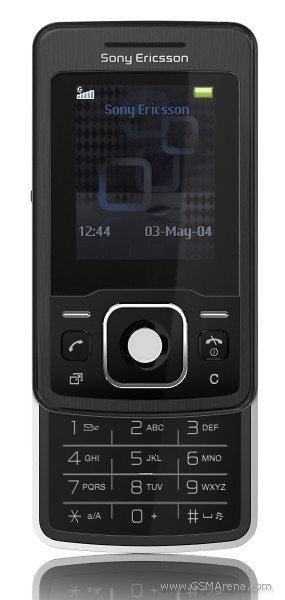
A sexy minimalist slider, Sony Ericsson T303 gives the low-end a new edge with looks and construction well above its rank. Even if not a full-house in terms of skill and style, the basic multimedia coverage and solid feel in hand are well worth it. The FM radio with RDS, MP3 player and the 1.3 megapixel camera make sure the T303 will be kept busy. After all, many will likely find it too sexy for a call-and-text device only. The smooth sliding, the sharp chrome-highlighted exterior and the diminutive size are still the undoubted winners when it comes to the attraction of Sony Ericsson T303. Way beyond any of the features it offers.
Key features
Very compact, sturdy build
Smooth sliding mechanism
FM radio with RDS
MP3 player, TrackID music recognition
Bluetooth v2.0
1.3 MP camera
1.8" 65K-color TFT display, 128 x 160 pixels
500 phonebook entries, photocall
Main disadvantages
Meager 8MB of built-in memory, no memory card slot
Poor screen quality
USB for charging and mass storage only
No zoom in picture gallery
No A2DP Bluetooth profile
Sony Ericsson T303 is definitely a phone for those who don't want to give too much thought to what pocket to put it in. With its dimensions of 83 x 47 x 14.7 mm it will fit even in the smallest of pockets. There are virtually a handful of phones currently on the market to come close to T303 in terms of compact size.
Its excellent build quality and solid feel in hand are strong advantages, considering how low-end phones usually suffer in both design and quality of materials used.
Sony Ericsson T303 will be available in two different color versions: Shimmering Silver and Shadow Black. Ours was the black variety. We were definitely pleased with its ergonomics, despite the extra compact dimensions. The controls and the alphanumeric keys are comfortable enough, while the unusually bare sides of the handset do add to its looks.
Design and construction
The Sony Ericsson T303 screen pays a dear price for the handset's compact size. It's a small 1.8" 65K-color TFT display of 128 x 160 pixels resolution. Above the display is the usual earpiece.
The control and navigation keypad below the display is quite comfortable. The large D-pad is neighbored by the two soft keys, the Call and End keys, and the "My shortcuts" and Clear keys. The D-pad itself is an amply sized square with silver trim. The loudspeaker grill is nestled underneath its confirmation center. The two soft keys also have the same silver finish. Tactility is excellent, save maybe for the flatbed My Shortcuts and Clear keys.
There is no thumb rest to facilitate sliding the phone up and down, but the slightly slanting surface under the D-pad works just as fine.
Speaking of sliding, let's look at the flatbed alphanumeric keypad. Keys are amply sized, considering the compact handset, and are well defined by thin rubber ridges. We were pleased with the keypad even if press feedback was a bit too soft for our taste. You won't have problems with accessing the keys on the first row either, an otherwise common flaw with sliders. The elevated chrome-highlighted lower rim of the keypad slightly impedes access to the bottom row of keys. On a different note, sliding is firm and smooth.
The left side of the T303 hosts only the Fast Port for connecting your headset, data cable or charger. Towards the top on this side is the lanyard eyelet.
Except for the tiny microphone pinhole at the bottom, the right and top side of the phone are pretty bare. The chrome lining of the sides contributes to the neat and attractive look of the device.
The centerpiece at the back is the Sony Ericsson logo. The rear side of T303 features a backwards bulge of surprisingly pleasant rubber finish to give the slider quite a good grip. The 1.3 megapixel camera lens is only exposed when the slider is open.
The rest of the rear is the matt plastic battery cover, which is easy to release by a gentle slide. The battery hidden underneath is a standard Sony Ericsson BST-38 Li-Po unit with a capacity of 930 mAh. It's quoted at up to 400 hours of standby time and up to 9 hours of talk time. Those are some serious numbers stated by the manufacturer but keeping in mind the small display and the fact that T303 is a GSM only phone, we may hope for 5-6 days of sparing usage.
Display quality and backlighting
The display is a 65K-color TFT unit, and it's the 128 x 160 pixel resolution that ruins the whole show. On-screen text looks a bit choppy and smudged. The other letdown is the small range of angles to allow adequate sunlight readability.
Despite those shortcomings, brightness is commendable and contrast is at the usual good level. The keypad backlighting of the T303 is solid blue and quite even.
User interface - low end upgrade
Sony Ericsson T303 has a scaled-down version of the regular Sony Ericsson interface. It lacks in looks and its functionality is nowhere near the standard offering, yet it is much sharper than what we found in T280.
Although there's no Flash Lite theme support, there are several upgrades over the core functionality of the UI, compared to the low-end peer Sony Ericsson T280 we previewed not so long ago. The major improvement is the tree soft key layout, which we love the most. Other than that, there is "My shortcuts" menu, tabbed settings, smart search, TrackID, etc.
Overall, it is nice to find several important features of the UI included in such a low end phone.
There are four themes preinstalled in the T303 - the first is not labeled, the remaining ones are Clarity, Gray Possession, and Silver charm. The animated .gif wallpapers are a welcome extra.
Phonebook
The phonebook stores up to 500 entries with a total of 2500 phone numbers available. As usual, you can choose whether the SIM contacts or the phone contacts should be default for the phonebook. Displaying both lists simultaneously is impossible. On a different note, a nice option allows you to auto save to SIM any new contacts that you're adding to the phone memory.
Contacts can be ordered by First or Last name. They are searched by gradual typing of the desired name. When adding a new contact, the first tab of fields offers 2 phone number fields. The second tab is for email addresses. The third is for assigning a picture, a custom ringtone, and a custom message tone. The fourth goes for postal details. The last, fifth tab, is for making an additional note and adding a birth date.
Call management
When it comes to making calls, a nice feature is the Smart Search, which lists all available contacts in the phonebook starting with the digits typed on the standby screen. The search facility looks up both letter combinations in names, and phone numbers that start with the digits entered.
The Call log is divided into four different tabs. They are: All, Answered (Received), Dialed and Missed. When there are several calls made to a single contact, only the last one gets displayed.
The loudspeaker performance is average. Here is how the Sony Ericsson T303 stacks up against some of the other handsets we've measured in our speakerphone loudness test.
T303 has a simple messaging functionality, with no email client onboard. What you get is text, picture and voice messaging. The Manage Messages function is not available but, luckily, sorting messages by category is available.
All messages use one Inbox. No matter what kind of message has been received, it goes to the shared Inbox. When composing a message, the character counter will alert you when you're 10 symbols short of the 160-character limit. The T9 dictionary goes without saying.
Users may opt to sort messages by category list, if a specific category has been defined for a message. Categories are fully customizable as well. You can also delete all messages in a given category.
Furthermore, messages in categories can have their own sorting with Contact, Date, and size the available filters to choose from. Much like in W890, in the general inbox there is no indication if a message has been assigned a category. The same holds true for messages that are opened.
Composing a picture/MMS message uses the same interface as most latest Sony Ericsson phones. Opening a new Voice message automatically starts the voice recorder. After the message has been recorded it can be sent immediately or played first.
Multimedia
The multimedia department is among the weakest points of the compact Sony EricssonT303. The decent mp3 player is the severely limited by the measly 8 MB of onboard storage with no memory card expansion.
With that in mind, even the very basic interface seems too much of an effort. Not to mention the fact that there are even several filters for sorting your tracks. Now, how about that? When the entire music collection boils down to two or three songs, all you need is Loop. And Shuffle gives away a… well… sick sense of humor. At least they didn't bother making optional skins for the player.
Images on the T303 are only accessible via the File manager from the organizer menu. Unfortunately, the viewing options are also scarce. There is no zoom function, and image browsing is quite sluggish. Images can be sent via Bluetooth or MMS, set as wallpaper or played as a slideshow. Moving/copying/renaming is among the few other usable options.
The integrated stereo FM radio of Sony Ericsson T303 has memory for 20 stations and supports RDS. The TrackID music recognition service is not integrated unfortunately. We thought we can deal with that limitation by minimizing the radio on speakerphone and turning on the TrackID. Sadly this trick doesn't work either, since the phone can run only one java application at a time.
Other than the standard functionality, users can record a song from the radio in a normal or high quality setting. Again, the memory limitation makes this feature useless.
The Track ID works like a charm, as usual.
1.3 megapixel camera, just for the sake of it!
Sony Ericson T303 has a mere 1.3 megapixel camera with no video recording or autofocus.
Among the few customizable things are picture size (1.3 MP, VGA), picture quality (fine, normal), effects (black & white, negative), and the night mode. In the main camera menu there are two additional settings - the 2.5 digital zoom (in VGA mode) and exposure correction from -2/+2.
Sony Ericsson T303 camera menu and options
Image quality is well below passable. It feels the camera is there just for demonstration purposes. The average file size is 180KB.
The camera does not record video and the phone cannot even play clips.
Our beta version of the T303 comes with no preloaded games, but the final version will surely have some preinstalled.
Connectivity, web browsing and applications
Sony Ericsson T303 is a tri-band GSM/GPRS phone. The only wireless data transfer option is Bluetooth v2.0. The handset will be available in two versions: T303i supporting GSM 900/1800/1900 and T303a for the Americas running on GSM 850/1800/1900.
The built-in java browser is usable, but has its limitations. We had a hard time browsing gsmarena.com, yet small or mobile-phone-optimized sites worked out well. The fullscreen and the text-only browsing views are at your disposal in case you don't like the standard browser view. Other settings like smart-fit and history are at hand too.
Sony Ericsson T303 offers several time-management features: File manager, Alarms, Calendar, Tasks, Notes, Timer, Stopwatch, and Calculator.
The Calendar offers monthly and weekly views. When you enter a birth date in the phonebook, the phone doesn't prompt adding it to the calendar. As far as alarms are concerned, there are five alarm slots available. Each one offers a lot of options - you can opt to repeat the alarm on chosen days of the week. Text and a picture can be added to the alarm.
Tasks can be two types: simple Tasks and Phone calls. Notes are written similar to messages; the T9 dictionary can be used here as well. A nice feature is the option to display notes on the Home screen.
The Sound recorder has no limit to recording length, making the free memory available the only - and harsh enough - restriction.
The Calculator is the regular Sony Ericsson application. It offers the basic functions, no bells and whistles.
There isn't much to note about the stopwatch and timer either.
Final words
Sony Ericsson T303 is a good enough attempt to fill in the low-end portfolio of the company. We can't frown at the modest, yet nice looking and compact phone, with quality finish and reasonable functionality. Design the undoubted highlight, Sony Ericsson T303 offers balanced performance for its class with Bluetooth, stereo FM radio, Smart search and TrackID.
We cannot overlook its major weakness, storage. The limited built-in memory and no card slot make the MP3 and the radio recording capabilities useless. We could also go on about a tad better display resolution and better imaging quality. The lack of PC synchronization is another potential downer.
By the way, it's easy to get carried away and that would be unfair to the affordable and unassuming T303. Overall, Sony Ericsson T303 is a tempting low-ender - it's sexy, it's mini, it makes sense.
Posted under:
Sony Ericsson
